

Medicare.gov - Find and Enter Your Prescription Drug Information
The next Medicare.gov screen allows you to enter your prescription medications — one at a time — and add them to your own personal Drug List.
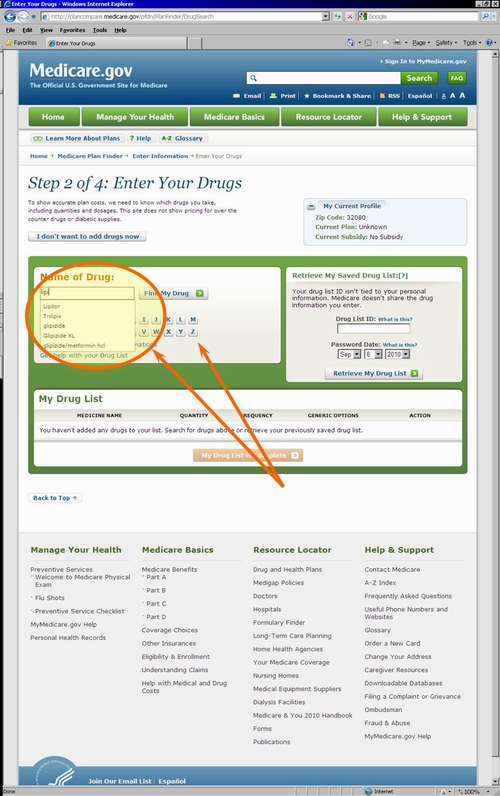
You may recall that, by law, Medicare Part D prescription plans and Medicare Advantage plans providing prescription coverage exclude certain medications. So if you are finding that one of your medications is never found in the Medicare drug database, then your drug might not be covered by the Medicare Part D program.
Alternatively, if you have been prescribed a very new medication that has just been released or approved by the FDA, it is possible that the Medicare medication database has not yet been updated and you should save your partial medication list (or drug search) and return to the Medicare Plan Finder at another time and check for the availability of your drug again.

In the older version of the Medicare.gov Plan Finder there was a check box under your drug list to "Use lower cost generic drugs when available." If you checked this box (the default is "checked"). Your name brand medications were automatically replaced with their generic drug equivalents.
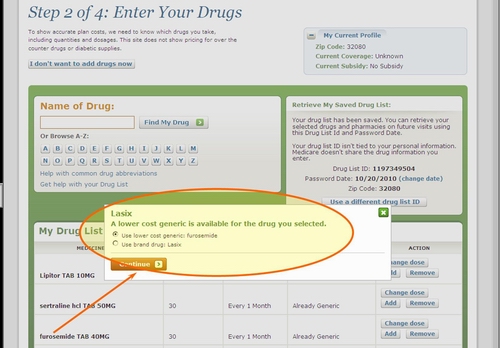
In the new version of the Medicare.gov Plan Finder, when you enter a brand name drug, the Plan Finder gives you the choice to select the generic equivalent. For example, if you enter the medication like Lasix®, the Medicare Plan Finder will ask if you would rather use the generic alternative, "Furosemide" - you can choose your preference BUT, the generic equivalent to your brand-name drug is chosen by default - so if you press quot;Continuequot;, your drug list will contain the generic, not the original brand-name medication.
Need another popular example?
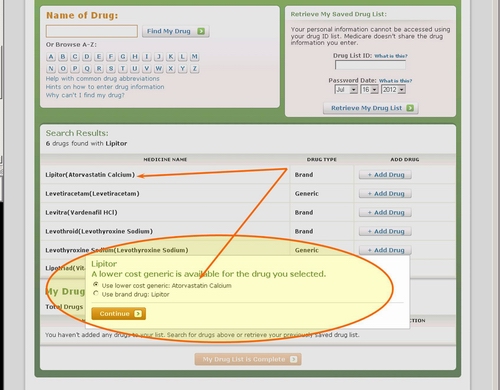
Here is another example of when a user has searched for a brand name medication, in this case Lipitor® and then prompted with substituting in the generic alternative Atorvastatin Calcium. If this was your search and you clicked on Continue, then Atorvastatin Calcium would be added to your drug list and not your originally chosen Lipitor ®.
- Sign-up for our Medicare Part D Newsletter.
- PDP-Facts: 2024 Medicare Part D plan Facts & Figures
- 2024 PDP-Finder: Medicare Part D (Drug Only) Plan Finder
- PDP-Compare: 2023/2024 Medicare Part D plan changes
- 2024 MA-Finder: Medicare Advantage Plan Finder
- MA plan changes 2023 to 2024
- Drug Finder: 2024 Medicare Part D drug search
- Formulary Browser: View any 2024 Medicare plan's drug list
- 2024 Browse Drugs By Letter
- Guide to 2023/2024 Mailings from CMS, Social Security and Plans
- Out-of-Pocket Cost Calculator
- Q1Medicare FAQs: Most Read and Newest Questions & Answers
- Q1Medicare News: Latest Articles
- 2025 Medicare Part D Reminder Service