

.
.
.
. . .
. . .
Q1 Medicare.com Click to Enter Your Drugs and Compare Medicare Part D Plans
Powered by Q1Group LLC Powered by Q1Group LLC.
Education and Decision Support Tools for the Medicare Community
.
. . .
. . .
. . .
.
. Home Contact Us Enroll . .
. . MAPD PDP 2014 FAQ Blog
.
. . .
. . . . . . .
.
.
: : Compare 2013 Medicare Rx and Health Plans by Drug Costs
: : See 2013 Medicare Drug Plans
: : 2013 Medicare Advantage Plans
: : Browse Any 2013 Plan Formulary
: : Compare a Drug's Coverage Across All 2013 Drug Plans
: : Newsletter Sign-up
. . . .


. .

Medicare.gov - Tutorial - Review Your Drug Dosages and Quantities

Once we see our selected medications and the Medicare Plan Finder already assigned them with the most common dosages — for instance Lipitor® is given a default or common value of 10mg tablet taken once a day (30 per month), all year. You can change the dosage, quantity and/or frequency and then click "Add drug and dosage".
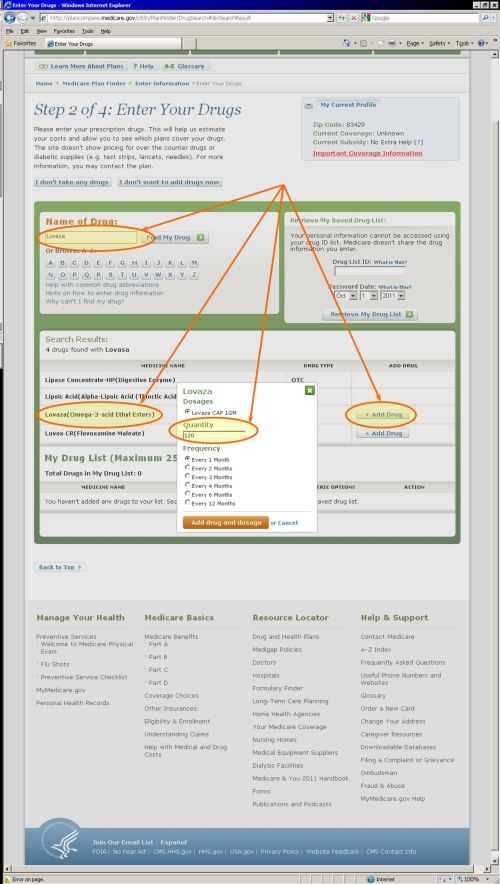

Medicare.gov - Tutorial - Add a Dosage .
If you use this medication at the same dosage more than once a day, then just add the two quantities together and enter the drug/dosage once in your drug list. If morning is a different strength (dosage) than evening, for example, then change the dosage/quantity and click the "Add drug and dosage" again. You will have the same drug added to your "Drug List" a second time - with the new dosage. Note, the same exact drug & dosage cannot be in the drug list more than once. The drug will be entered at the bottom of your list so you may need to scroll down if your medication list is long to see the addition of the drug.

Medicare.gov - Tutorial - Review Your Drug Dosages and Quantities .
:: Top

Choose the dosages that best describe your actual purchase habits .
Try to choose the dosages that best describe your actual life. If you purchase 500mg pills and cut them in half because your prescription actually calls for 250mg two times a day, then choose 500mg tablets with a quantity of 30 per month — instead of 250mg tablets at 60 per month. Remember, you are trying to reflect your purchases of the medications, not your actual taking of the medications. So there is no way to enter "taken as needed" instead ask yourself how often you purchase this medication. "Take as needed" could mean 3 times per day or it could also mean once every other month. Your purchase pattern leads to a much more accurate Medicare plan comparison.

When you are finished refining your drug list, you can click on "My Drug List is Complete " to continue with the Medicare Plan Finder process.


» Next Step: Medicare.gov - Return to a Saved Drug List »
« Previous Step: Medicare.gov - Search by Drug Name «
:: Back to Medicare.gov Part D Plan Finder Tutorial Overview
:: Top


Last updated on: 10/14/2012

Click the +1 button if you have found this page useful:  

.
.
Medicare Supplements
fill the gaps in your
Original Medicare
1. Select Your State:
.


.
.

.
Medicare PartD MAPD and PDP plan comparisons .

Quick Links
: : Find a 2013 Plan by Drug Costs
: : 2013 Part D Plan Facts & Figures
: : 2013 Part D PDP-Finder (Drug Only) Plan Finder
: : Compare 2012/2013 PDP Plans
: : 2013 MA-Finder: Medicare Advantage Plan Finder
: : Compare 2012/2013 Medicare Advantage Plans
: : Guided Help Finding a 2013 Prescription Drug Plan
: : 2013 Part D Drug Finder
: : Browse Any 2013 Part D Plan Formulary
: : 2013 Browse Drugs By Letter
: : RxSavings-Center
: : 2014 Plan Information Reminder Service
.

: : Click here to link to this page on your website
.

    Follow Q1Medicare on Twitter
.

   
. . .
. . .
.
.
What’s New Most Viewed Press . .
.
. . .
.
Sitemap About Us Privacy Policy Newsletter Sign-up Blog FAQ Contact Us Terms Of Use Newsroom
. Enroll in Medicare Part D © Q1Group LLC 2005 - 2013 . .
. . .
. . .
.
.
. .

.
.
.